
 Svenska
Cart
Your cart is empty, but doesn't have to be..
Your cart is empty, but doesn't have to be..
Hampus Niskala |10/02, 2026
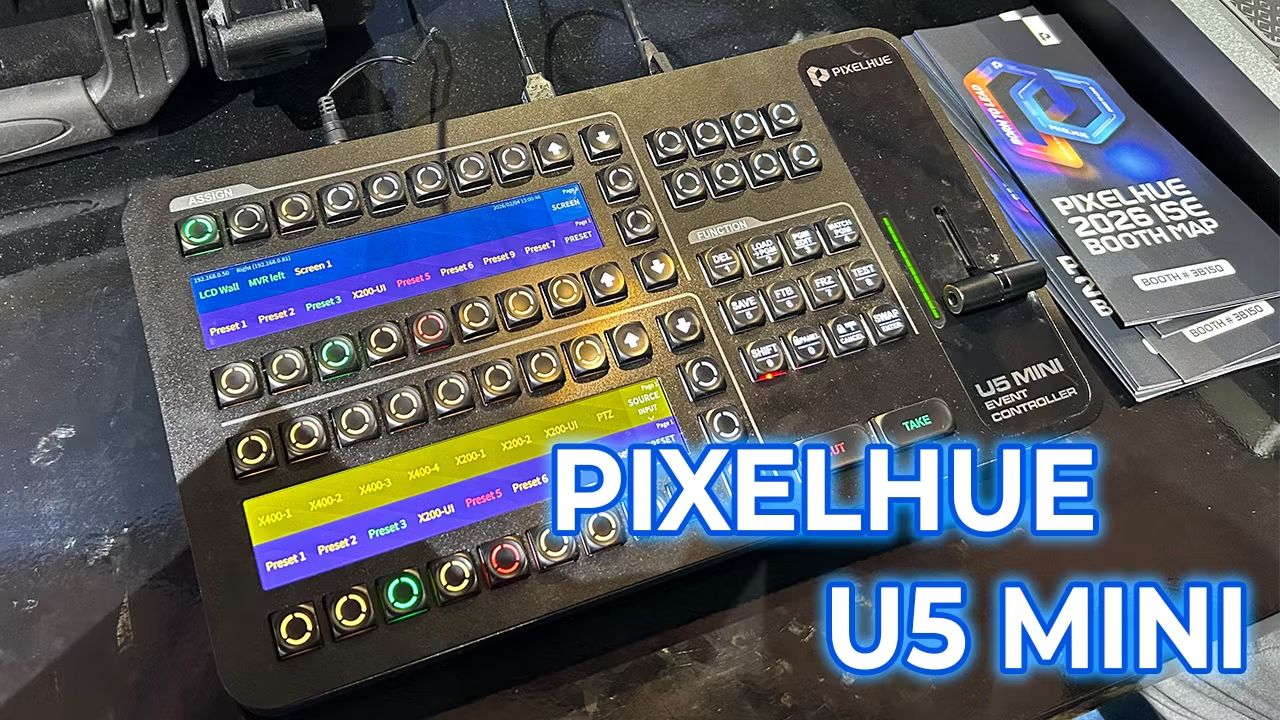
At ISE 2025 in Barcelona, Pixelhue showed a new product in early beta: the U5 MINI Event Controller. The idea is simple (and honestly overdue): deliver the hands-on speed of a real event controller, but in a smaller footprint and at a more accessible price point than the full-size U5 Event Controller.
Because the U5 Mini is still beta, the final hardware layout, firmware features, and availability may change before release — but the prototypes on display already reveal a lot about Pixelhue’s direction.
Pixelhue positions the U5 Event Controller as a premium live console, built for visual, touch-driven operation and deep control. Officially, the U5 features: 87 user-programmable LCD buttons, 4 encoders, 8 faders, a high-resolution T-bar, plus a large dual-screen setup: a 21.5” main touchscreen and an 8” smart touchscreen.
That design is excellent when you want:
maximum on-desk visibility (big UI + multiview style workflows),
lots of physical controls,
and a “control-room console” feel.
But that’s also exactly why some P10 / P20 users look at the U5 and think: “Amazing — but more than I need for this rig.”
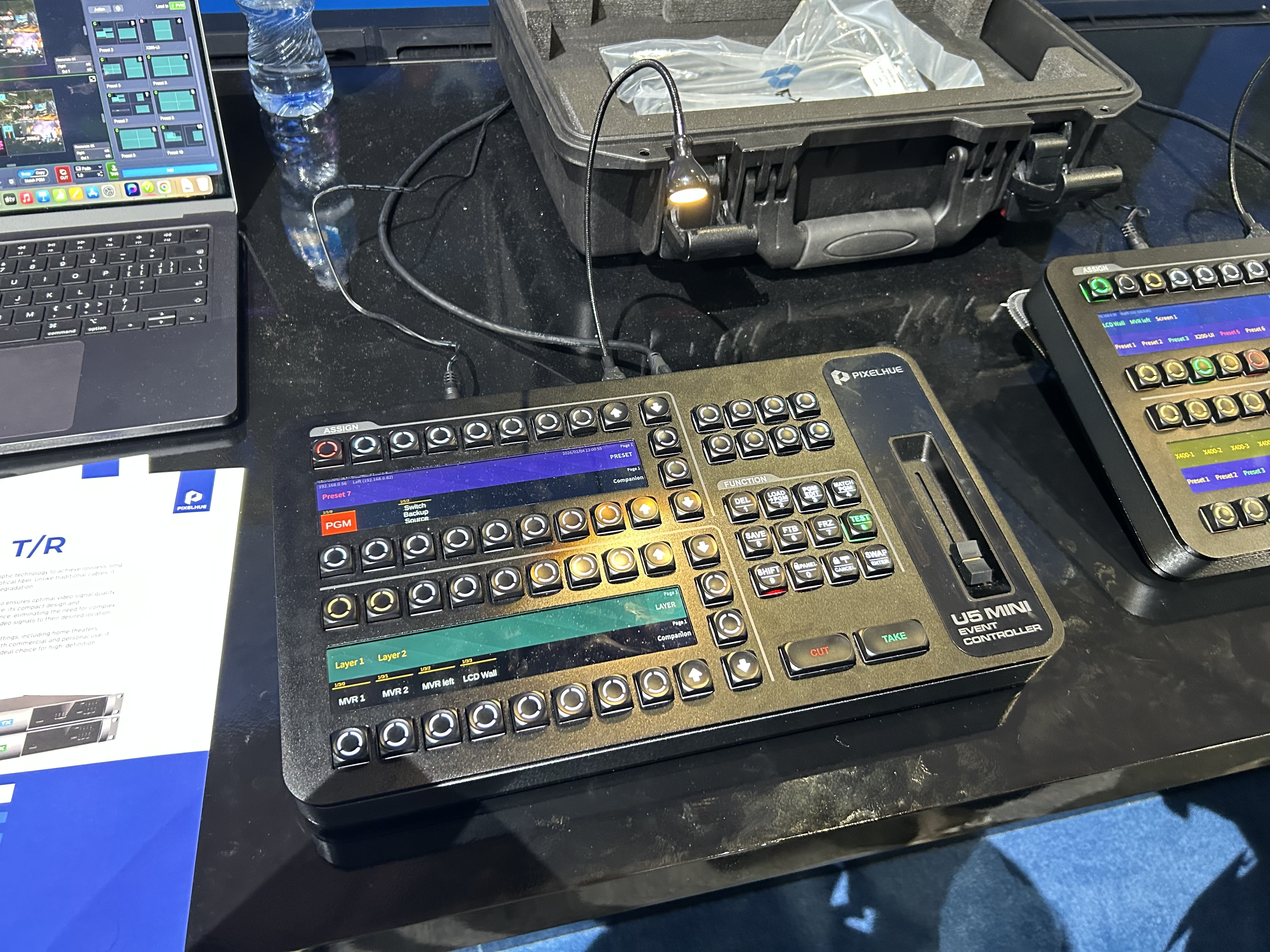
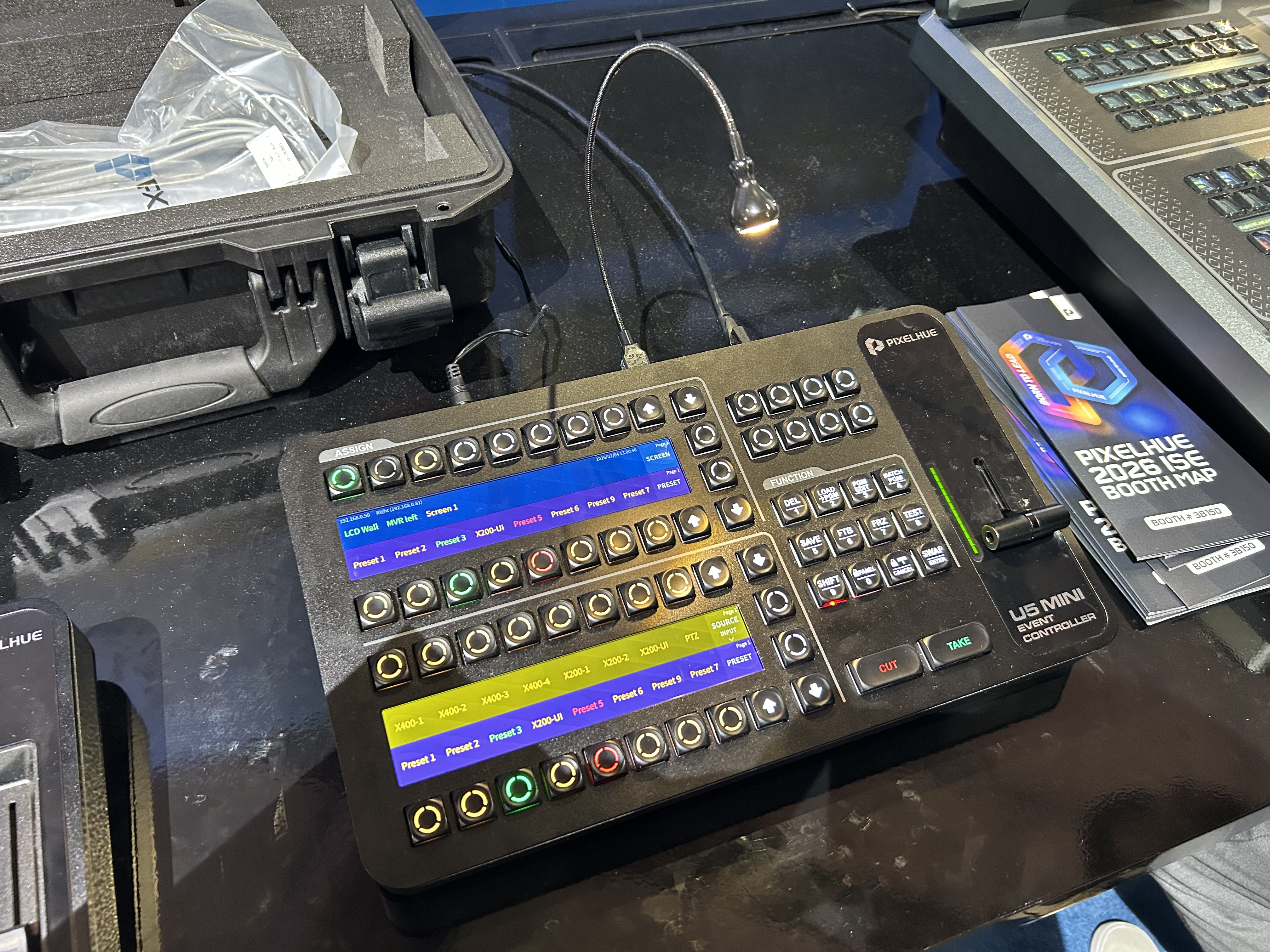
Our photos show two U5 Mini prototypes:
A fade lever version (vertical fader slot on the right side)
A T-bar version (classic live-switching bar on the right side)
And importantly: the Mini isn’t “just smaller.” It’s clearly designed to keep the event-controller workflow while trimming the console footprint.
From the U5 Mini beta units shown:
Two smaller horizontal screens (instead of the U5’s large 21.5” + 8” display stack)
A dense, tactile button layout optimized for “hands-only” operation
52 “Assign / navigation” buttons (as seen across the top/around the screen sections)
12 dedicated “Function” buttons (clearly labeled under the “FUNCTION” header)
Dedicated CUT and TAKE buttons (bottom right)
One of two transition control styles depending on the model: fade lever or T-bar
This matters because it tells us the Mini is built for operators who want:
quick preset hits
fast layer/source switching
reliable transitions
…without needing a full “touch-heavy” console.
U5: Large, highly visual control with 21.5” + 8” touchscreens.
U5 Mini: Two smaller status/control screens (seen in the photos), designed more for quick reference + button-driven workflows.
Who wins?
If you want the most visual workflow and touch interaction: U5
If you want compact control that still feels like a show controller: U5 Mini
U5: Pixelhue specifies 87 programmable LCD buttons, plus 4 encoders and 8 faders.
U5 Mini: The beta units clearly focus on dense, dedicated controls: 52 assign/navigation buttons, 12 function buttons, and CUT/TAKE, plus either fade or T-bar transitions.
Translation: U5 is the full console. U5 Mini looks like the “sweet spot” for everyday P10/P20 event switching where speed matters more than a giant touch UI.
U5: Officially includes a high-resolution T-bar, and the Quick Start Guide explicitly references using T-bar / CUT / TAKE for sending preview to program.
U5 Mini: The beta units show the same core approach: CUT and TAKE, plus either fade lever or T-bar depending on model.
This is huge: Pixelhue is keeping the muscle memory intact — U5 users can step down to Mini without relearning how to drive a show.
Pixelhue’s own documentation groups the P-series (including P10 / P20) together with the U-series event controllers, which is exactly the ecosystem the U5 Mini is aimed at.
In practice, the U5 Mini makes sense when you want:
a real event-control surface for P10/P20,
a more compact footprint for flypacks and small desks,
a more cost-justified controller than a full U5 console for many everyday shows.
If your P10/P20 jobs are:
corporate events, smaller touring setups, ballrooms, churches, rental packages, breakout rooms, or portable LED walls —
…the U5 Mini is shaping up to be the “finally, that’s the one” controller.
Pixelhue showed U5 Mini as a beta-phase product, so final hardware, features, and availability may still change. But the ISE prototypes already look like a serious direction: U5-style show control, simplified and compact.
If you want the event-controller workflow without committing to the full U5 console, the U5 Mini is one of the most exciting Pixelhue developments we’ve seen for P10/P20 users.
👉 Contact us to be first in line when U5 Mini moves from beta to release.